YorkApp: Kentsel Dönüşüm Sürecini Tek Ekranda Takip Etmek
York İnşaat için tasarlayıp geliştirdiğim YorkApp, belediye evrakından şantiye günlüğüne kadar bir kentsel dönüşüm projesini tek uygulamada topluyor.
YorkApp: Tracking an Urban Renewal Project on One Screen
YorkApp, which I designed and built for York İnşaat, brings an entire urban renewal project together in one app, from municipal paperwork to the site diary.
YorkApp: seguir un proyecto de renovación urbana en una pantalla
YorkApp, que diseñé y desarrollé para York İnşaat, reúne en una sola aplicación todo un proyecto de renovación urbana, de los trámites municipales al diario de obra.
YorkApp: ein Stadterneuerungsprojekt auf einem Bildschirm steuern
YorkApp, die ich für York İnşaat gestaltet und entwickelt habe, bündelt ein ganzes Stadterneuerungsprojekt in einer App – von Behördenunterlagen bis zum Bautagebuch.
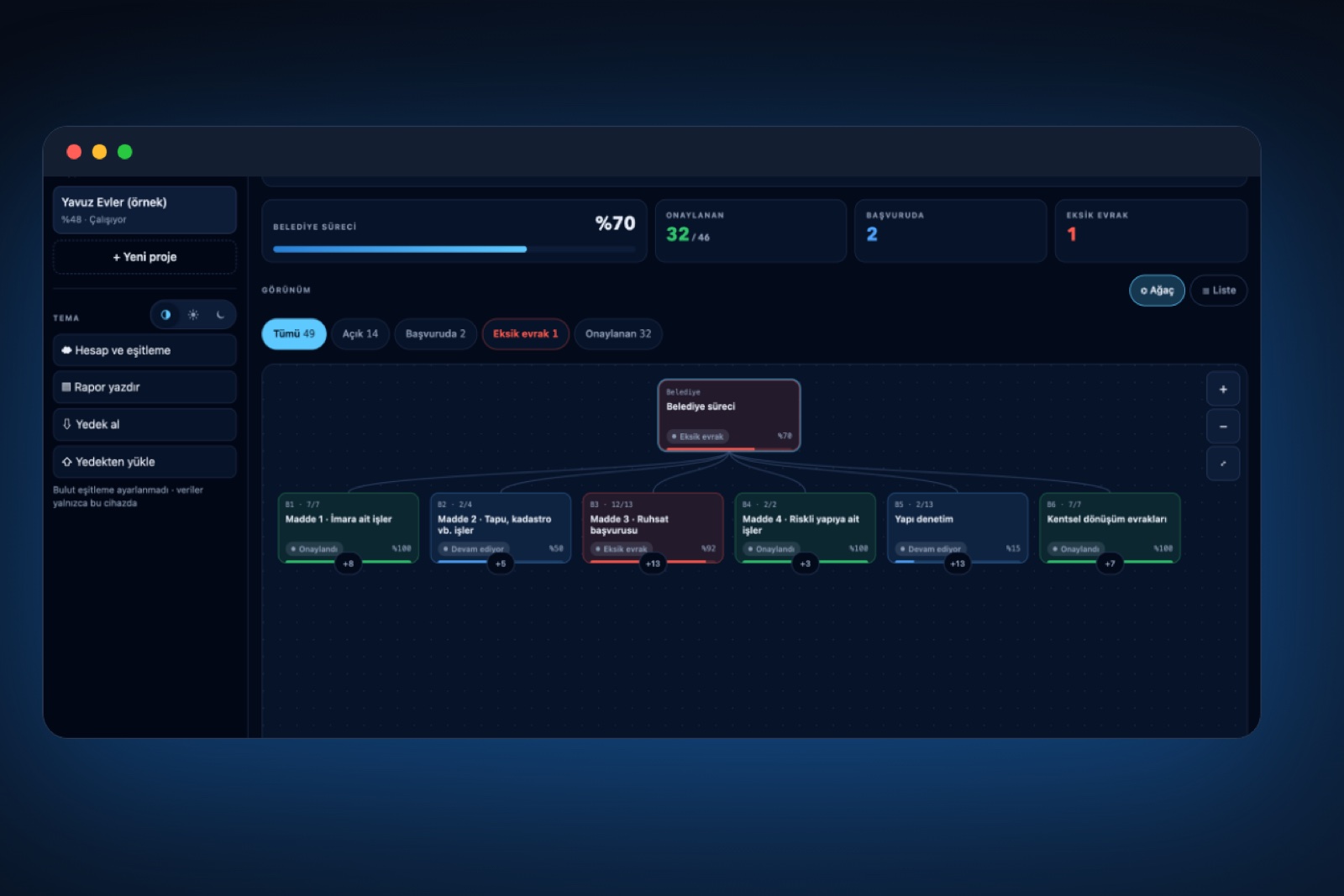
Bir kentsel dönüşüm projesi aynı anda iki ayrı cephede ilerler. Bir yanda belediye masası vardır: imar, tapu ve kadastro, ruhsat, riskli yapı ve yapı denetim süreçleri. Öbür yanda şantiye sahası: yıkım, hafriyat, kaba inşaat, ekipler, malzeme ve günlük saha kayıtları. Bu iki akışın bilgisi farklı defterlere, mesaj gruplarına ve klasörlere dağıldığında, bir evrakın eksik olduğu ya da bir işin geciktiği çoğu zaman geç fark edilir. York İnşaat için tasarlayıp geliştirdiğim YorkApp, bu dağınıklığı tek bir kentsel dönüşüm uygulamasında toplamak için ortaya çıktı.
Çıkış noktası: sahada zaten kullanılan form
Yeni bir yazılım tasarlarken en sık yapılan hata, ekibe alışık olmadığı bir düzen dayatmaktır. Bu yüzden işe boş bir sayfadan değil, firmanın hâlihazırda kullandığı belediye takip formundan başladım. Formdaki başlıkları ve kalemleri uygulamanın bilgi mimarisine dönüştürdüm. Amaç, bilgi sistemleri literatüründe tek doğruluk kaynağı (single source of truth) olarak adlandırılan ilkeyi hayata geçirmekti: bir bilginin yalnızca bir yerde tutulması ve herkesin aynı güncel kaydı görmesi.
Belediye ve şantiye: iki sekme, tek mantık
Uygulama iki ana sekmeden oluşuyor. Belediye sekmesinde süreç altı bölüme ayrılıyor: imara ait işler, tapu ve kadastro işleri, ruhsat başvurusu, riskli yapıya ait işler, yapı denetim ve kentsel dönüşüm evrakları. Her kalem başlanmadı, başvuruldu, eksik evrak, onaylandı ya da gerekmiyor olarak işaretleniyor; başvuru ve onay tarihi, evrak numarası, not ve evrak fotoğrafı kalemin içinde saklanıyor.
Şantiye sekmesi aynı altyapıyı yedi takip listesiyle kullanıyor: inşaat ilerlemesi, şantiye kurulumu, iş sağlığı ve güvenliği, ekipler ve taşeronlar, malzeme ve tedarik, saha kontrolleri ve tutanaklar, çevre ve komşular. İki sekmenin aynı mantıkla çalışması, kullanıcının bir kez öğrendiği şeyi her yerde uygulayabilmesi anlamına geliyor. Her iki sekmede de ilk ekranda sürecin yüzdesi ve durum sayıları görünüyor; bölümler ister ağaç ister liste görünümünde açılabiliyor.
Sahadan gelen kayıt: şantiye günlüğü
Şantiye şefinin gün sonunda dolduracağı kayıt kısa tutuldu: tarih, hava durumu, işçi sayısı, şantiyenin çalışma durumu (çalışıyor, kısmi çalışma ya da durdu), yapılan işler, sorunlar ve fotoğraflar. Aynı ekranda proje bilgileri ve malik mutabakatı da yer alıyor; toplanan imza sayısı ve çoğunluk eşiğine kalan imza bir gösterge üzerinde izlenebiliyor.
Sahanın koşullarına göre mühendislik
Şantiyede internet bağlantısı her zaman güvenilir değildir. Bu nedenle YorkApp çevrimdışı çalışacak biçimde kurgulandı: her değişiklik önce cihaza kaydediliyor, bağlantı geldiğinde buluta eşitleniyor. Uygulama, cihazın Wi-Fi'a bağlı görünüp internete çıkamadığı durumu da ayrıca algılıyor. Aynı arayüz iPhone uygulaması olarak ve ana ekrana eklenebilen bir web uygulaması olarak çalışıyor; aynı hesapla giriş yapan telefon, tablet ve bilgisayar aynı projeleri görüyor. Yanlışlıkla yapılan değişiklikler için son on adımı geri alma, ayrıca tek dokunuşla yedek alma ve yedekten geri yükleme özellikleri bulunuyor.
Güvenlik ve erişim
Proje verisi hassas bilgiler içerdiği için erişim baştan sınırlandırıldı. Hesaplar yalnızca davetle açılıyor. Erişim kuralları uygulamanın içinde değil, doğrudan veritabanı düzeyinde tanımlandı; giriş yapmamış bir kullanıcı hiçbir veriye ulaşamıyor. Fotoğraflar herkese açık olmayan bir depolama alanında tutuluyor ve yalnızca resim dosyalarına, en fazla 8 MB boyutla izin veriliyor.
Arayüz: okunabilirlik önce gelir
Arayüz aydınlık, karanlık ve telefonun ayarını izleyen otomatik tema seçenekleriyle çalışıyor. Durum renkleri hiçbir zaman tek başına bırakılmadı; her renk, yanında yazılı bir etiketle birlikte görünüyor. Böylece bilgi, ekran parlaklığından ya da renk algısından bağımsız olarak okunabiliyor.
Pratikte ne anlama geliyor?
İnşaat ve gayrimenkul firmaları için dijitalleşmenin en verimli yolu çoğu zaman en gösterişlisi değildir. YorkApp'i geliştirirken öne çıkan ilkeler şunlar oldu:
- Ekibin zaten kullandığı formdan ve dilden yola çıkmak.
- Sahayı gerçek koşullarıyla düşünmek: bağlantı kopar, eller doludur, kayıt kısa olmalıdır.
- Erişim ve güvenlik kurallarını sonradan değil, ilk günden tasarlamak.
- Benzer süreçler için tek bir mantık kurup her yerde aynı biçimde uygulamak.
YorkApp'in ekranlarını ve ayrıntılarını ardasofraci.com üzerindeki Referanslar bölümünde, uygulama sunumunda inceleyebilirsiniz.
An urban renewal project moves forward on two fronts at once. On one side is the municipal desk: zoning, title deeds and cadastre, building permits, risky-building procedures and building inspection. On the other is the construction site: demolition, excavation, structural work, crews, materials and daily site records. When the information from these two streams is scattered across notebooks, message groups and folders, a missing document or a delayed task is often noticed late. YorkApp, which I designed and built for York İnşaat, was created to bring this scattered information together in a single urban renewal app.
Starting point: the form already used on site
The most common mistake when designing new software is to impose a structure the team is not used to. So rather than starting from a blank page, I started from the municipal tracking form the company was already using, and turned its headings and items into the app's information architecture. The aim was to apply what information systems literature calls a single source of truth: each piece of information is kept in one place, and everyone sees the same up-to-date record.
Municipality and site: two tabs, one logic
The app has two main tabs. In the Municipality tab the process is divided into six sections: zoning matters, title deed and cadastre, the building permit application, risky-building procedures, building inspection and urban renewal documents. Each item is marked as not started, applied, missing documents, approved or not required, and the application and approval dates, reference number, notes and a photo of the document are stored with the item.
The Site tab uses the same foundation with seven tracking lists: construction progress, site setup, health and safety, crews and subcontractors, materials and procurement, site inspections and reports, and surroundings and neighbours. Because both tabs work the same way, whatever users learn once applies everywhere. Both show the overall progress and status counts on the first screen, and sections can be opened as a tree or as a list.
Records from the field: the site diary
The entry a site manager fills in at the end of the day is kept short: date, weather, number of workers, the site's working status (working, partial work or stopped), work done, issues and photos. The same screen also shows the project details and owner consent: the number of signatures collected and how many are still needed to reach the majority threshold are tracked on a single gauge.
Engineering for real site conditions
Internet access on a construction site is not always reliable, so YorkApp was built to work offline: every change is saved to the device first and synced to the cloud once a connection is available. The app also detects the case where a device appears to be on Wi-Fi but cannot reach the internet. The same interface runs as an iPhone app and as a web app that can be added to the home screen; a phone, tablet and computer signed in with the same account see the same projects. Accidental changes can be undone up to ten steps back, and backups can be created and restored with a single tap.
Security and access
Because project data contains sensitive information, access was restricted from the start. Accounts are opened by invitation only. Access rules are defined at the database level rather than inside the app, so a user who is not signed in cannot reach any data. Photos are kept in a storage area that is not public, and only image files of up to 8 MB are accepted.
Interface: readability first
The interface offers a light theme, a dark theme and an automatic option that follows the phone's setting. Status colours are never used on their own; every colour appears together with a written label, so the information remains readable regardless of screen brightness or colour perception.
What does this mean in practice?
For construction and real estate companies, the most effective path to digitalisation is often not the flashiest one. These were the principles that guided YorkApp:
- Start from the forms and language the team already uses.
- Design for real site conditions: connections drop, hands are full, entries must be short.
- Design access and security rules from day one, not as an afterthought.
- Build one logic for similar processes and apply it the same way everywhere.
You can explore YorkApp's screens and details in the app presentation in the References section of ardasofraci.com.
Un proyecto de renovación urbana avanza en dos frentes a la vez. Por un lado está la ventanilla municipal: urbanismo, registro y catastro, licencia de obra, trámites de edificios de riesgo e inspección técnica. Por otro, la obra: demolición, excavación, estructura, equipos, materiales y registros diarios. Cuando la información de estos dos flujos se reparte entre cuadernos, grupos de mensajes y carpetas, un documento pendiente o una tarea retrasada suele detectarse tarde. YorkApp, que diseñé y desarrollé para York İnşaat, nació para reunir esa información dispersa en una sola aplicación de renovación urbana.
Punto de partida: el formulario que ya se usaba
El error más habitual al diseñar un software nuevo es imponer al equipo una estructura a la que no está acostumbrado. Por eso no partí de una página en blanco, sino del formulario de seguimiento municipal que la empresa ya utilizaba, y convertí sus apartados y partidas en la arquitectura de información de la aplicación. El objetivo era aplicar lo que la literatura de sistemas de información llama fuente única de verdad (single source of truth): cada dato se guarda en un solo lugar y todos ven el mismo registro actualizado.
Ayuntamiento y obra: dos pestañas, una misma lógica
La aplicación tiene dos pestañas principales. En la pestaña Ayuntamiento, el proceso se divide en seis secciones: asuntos urbanísticos, registro y catastro, solicitud de licencia, trámites de edificio de riesgo, inspección técnica y documentos de renovación urbana. Cada partida se marca como sin empezar, solicitada, falta documentación, aprobada o no necesaria, y en ella se guardan las fechas de solicitud y aprobación, el número de expediente, notas y una foto del documento.
La pestaña Obra usa la misma base con siete listas de seguimiento: avance de obra, instalación de obra, seguridad y salud laboral, equipos y subcontratas, materiales y suministros, inspecciones y actas, y entorno y vecinos. Como ambas pestañas funcionan igual, lo que el usuario aprende una vez le sirve en todas partes. Las dos muestran en la primera pantalla el porcentaje del proceso y los recuentos por estado, y las secciones pueden verse como árbol o como lista.
Registros desde la obra: el diario de obra
El registro que el jefe de obra completa al final del día es breve: fecha, clima, número de trabajadores, estado de la obra (en marcha, trabajo parcial o detenida), trabajos realizados, incidencias y fotos. En la misma pantalla aparecen los datos del proyecto y el acuerdo de los propietarios: las firmas reunidas y las que faltan para alcanzar la mayoría se siguen en un solo indicador.
Ingeniería pensada para la obra real
En una obra, la conexión a internet no siempre es fiable. Por eso YorkApp se diseñó para funcionar sin conexión: cada cambio se guarda primero en el dispositivo y se sincroniza con la nube cuando vuelve la conexión. La aplicación detecta además el caso en que el dispositivo parece conectado al wifi pero no tiene acceso a internet. La misma interfaz funciona como app para iPhone y como aplicación web que se puede añadir a la pantalla de inicio; móvil, tableta y ordenador con la misma cuenta ven los mismos proyectos. Los cambios accidentales pueden deshacerse hasta diez pasos atrás, y las copias de seguridad se crean y restauran con un solo toque.
Seguridad y acceso
Como los datos del proyecto incluyen información sensible, el acceso se limitó desde el principio. Las cuentas solo se abren por invitación. Las reglas de acceso se definen directamente en la base de datos, no dentro de la aplicación, de modo que un usuario sin sesión iniciada no puede acceder a ningún dato. Las fotos se guardan en un almacenamiento no público, y solo se aceptan imágenes de hasta 8 MB.
Interfaz: primero, la legibilidad
La interfaz ofrece tema claro, tema oscuro y una opción automática que sigue la configuración del teléfono. Los colores de estado nunca aparecen solos: cada color va acompañado de una etiqueta escrita, de modo que la información se lee con independencia del brillo de la pantalla o de la percepción del color.
¿Qué significa en la práctica?
Para las empresas de construcción e inmobiliarias, el camino más eficaz hacia la digitalización no suele ser el más vistoso. Estos fueron los principios que guiaron YorkApp:
- Partir de los formularios y el lenguaje que el equipo ya utiliza.
- Pensar en las condiciones reales de la obra: la conexión se corta, las manos están ocupadas, los registros deben ser breves.
- Diseñar el acceso y la seguridad desde el primer día, no después.
- Crear una lógica para procesos similares y aplicarla igual en todas partes.
Puedes ver las pantallas y los detalles de YorkApp en la presentación de la aplicación, en la sección de Referencias de ardasofraci.com.
Ein Stadterneuerungsprojekt läuft gleichzeitig an zwei Fronten. Auf der einen Seite steht die Behörde: Bebauungsfragen, Grundbuch und Kataster, Bauantrag, Verfahren für Risikogebäude und Bauaufsicht. Auf der anderen Seite die Baustelle: Abriss, Aushub, Rohbau, Teams, Material und tägliche Baustellenberichte. Wenn die Informationen beider Stränge über Notizbücher, Chatgruppen und Ordner verteilt sind, fallen fehlende Unterlagen oder verzögerte Arbeiten oft erst spät auf. YorkApp, die ich für York İnşaat gestaltet und entwickelt habe, entstand, um diese verstreuten Informationen in einer einzigen App für die Stadterneuerung zusammenzuführen.
Ausgangspunkt: das Formular, das bereits im Einsatz war
Der häufigste Fehler bei neuer Software ist, dem Team eine ungewohnte Struktur aufzuzwingen. Deshalb begann ich nicht mit einem leeren Blatt, sondern mit dem Formular zur Behördenverfolgung, das das Unternehmen bereits nutzte, und übertrug dessen Rubriken und Positionen in die Informationsarchitektur der App. Ziel war das Prinzip, das in der Literatur zu Informationssystemen Single Source of Truth heißt: Jede Information wird an genau einer Stelle geführt, und alle sehen denselben aktuellen Stand.
Behörde und Baustelle: zwei Tabs, eine Logik
Die App besteht aus zwei Haupt-Tabs. Im Tab Behörde ist der Prozess in sechs Bereiche gegliedert: Bebauungsfragen, Grundbuch und Kataster, Bauantrag, Verfahren für Risikogebäude, Bauaufsicht und Unterlagen zur Stadterneuerung. Jeder Eintrag wird als nicht begonnen, beantragt, fehlende Unterlagen, genehmigt oder nicht erforderlich markiert; Antrags- und Genehmigungsdatum, Aktenzeichen, Notizen und ein Foto der Unterlage werden direkt im Eintrag gespeichert.
Der Tab Baustelle nutzt dieselbe Grundlage mit sieben Listen: Baufortschritt, Baustelleneinrichtung, Arbeitsschutz, Teams und Subunternehmer, Material und Beschaffung, Baustellenkontrollen und Protokolle sowie Umfeld und Nachbarn. Weil beide Tabs gleich funktionieren, gilt alles, was man einmal gelernt hat, überall. Beide zeigen auf dem ersten Bildschirm den Fortschritt in Prozent und die Zahlen je Status; die Bereiche lassen sich als Baum oder als Liste öffnen.
Einträge von der Baustelle: das Bautagebuch
Der Eintrag, den die Bauleitung am Ende des Tages ausfüllt, ist bewusst kurz: Datum, Wetter, Zahl der Arbeitskräfte, Arbeitsstatus der Baustelle (läuft, teilweise oder gestoppt), erledigte Arbeiten, Probleme und Fotos. Auf demselben Bildschirm stehen die Projektdaten und die Zustimmung der Eigentümer: Die gesammelten Unterschriften und die bis zur Mehrheit noch fehlenden werden in einer Anzeige verfolgt.
Technik für echte Baustellenbedingungen
Auf der Baustelle ist die Internetverbindung nicht immer zuverlässig. Deshalb funktioniert YorkApp offline: Jede Änderung wird zuerst auf dem Gerät gespeichert und bei bestehender Verbindung mit der Cloud synchronisiert. Die App erkennt außerdem den Fall, dass ein Gerät zwar mit dem WLAN verbunden scheint, aber keinen Internetzugang hat. Dieselbe Oberfläche läuft als iPhone-App und als Web-App, die sich auf dem Homescreen ablegen lässt; Handy, Tablet und Computer mit demselben Konto sehen dieselben Projekte. Versehentliche Änderungen lassen sich bis zu zehn Schritte rückgängig machen, Sicherungen werden mit einem Tipp erstellt und wiederhergestellt.
Sicherheit und Zugriff
Da Projektdaten sensible Informationen enthalten, wurde der Zugriff von Anfang an begrenzt. Konten werden nur auf Einladung eröffnet. Die Zugriffsregeln sind direkt auf Datenbankebene festgelegt, nicht in der App; wer nicht angemeldet ist, erreicht keinerlei Daten. Fotos liegen in einem nicht öffentlichen Speicher, und es werden nur Bilddateien bis 8 MB angenommen.
Oberfläche: Lesbarkeit zuerst
Die Oberfläche bietet ein helles und ein dunkles Design sowie eine automatische Option, die der Einstellung des Telefons folgt. Statusfarben stehen nie allein; jede Farbe erscheint zusammen mit einer Textbezeichnung, sodass die Information unabhängig von Bildschirmhelligkeit oder Farbwahrnehmung lesbar bleibt.
Was bedeutet das in der Praxis?
Für Bau- und Immobilienunternehmen ist der wirksamste Weg zur Digitalisierung oft nicht der auffälligste. Diese Grundsätze haben YorkApp geprägt:
- Bei den Formularen und der Sprache ansetzen, die das Team bereits nutzt.
- Für echte Baustellenbedingungen planen: Verbindungen brechen ab, die Hände sind voll, Einträge müssen kurz sein.
- Zugriffs- und Sicherheitsregeln vom ersten Tag an mitdenken, nicht im Nachhinein.
- Für ähnliche Abläufe eine Logik schaffen und sie überall gleich anwenden.
Die Bildschirme und Details von YorkApp finden Sie in der App-Präsentation im Bereich Referenzen auf ardasofraci.com.